Showing posts with label electrical. Show all posts

Thursday, June 16, 2011

Field desk - part 3 - Electrical System and lighting

Electrical services into, and within, the field desk.

Electrically speaking, the field desk will have one power lead into the desk, with a double switched GPO, and a variety of DC power sources available. A task light will also feature in the design.

Electrical enclosure

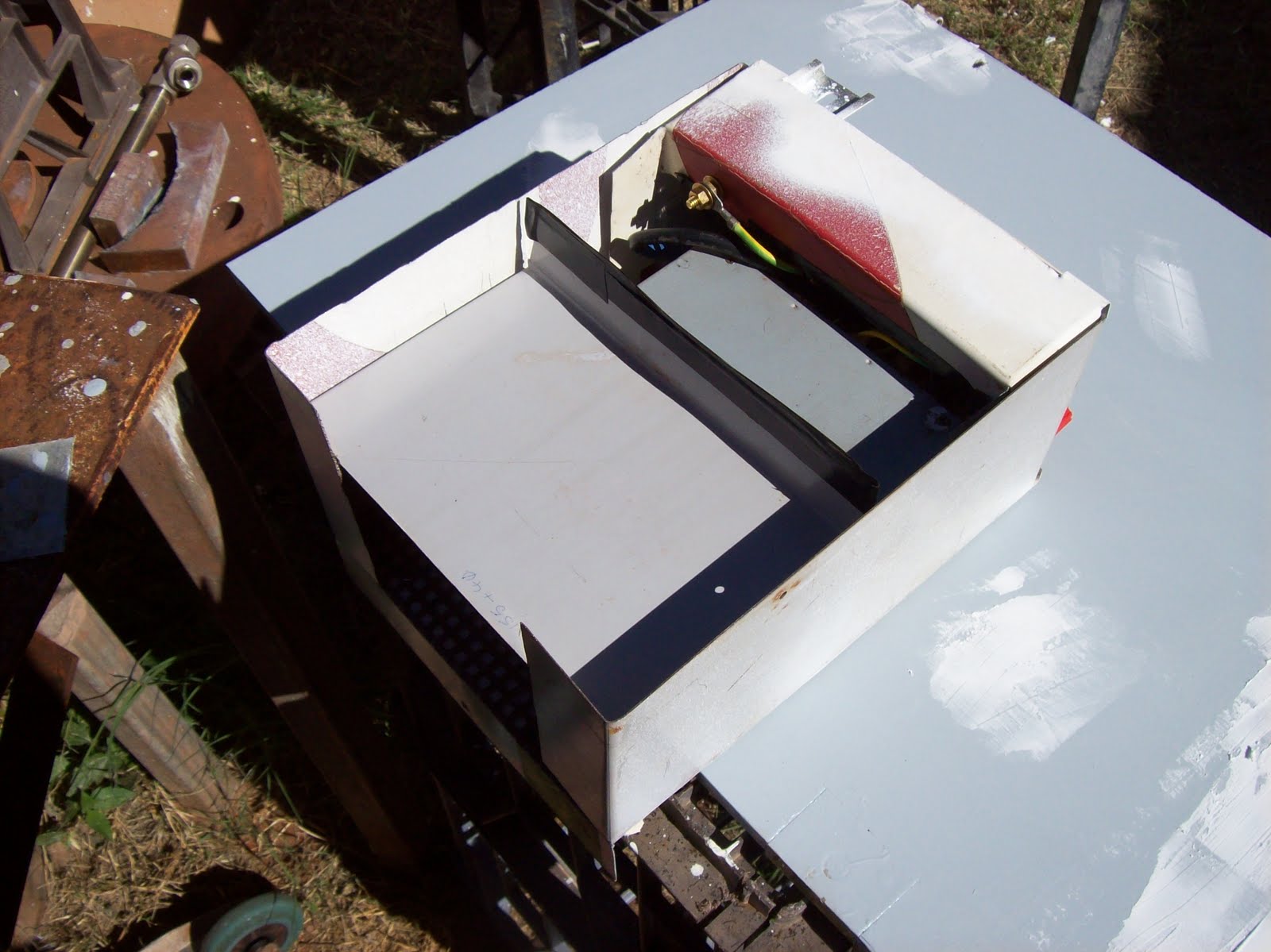
The electrical enclosure was designed to contain all components, and attach in the top of the RHS bay. The front panel will contain all interfaces - plugs, switches, etc. The original design was to use an old PSU from a 1900 series switch, but  upon checking the PSU, it was found to have some of it's pins non-commissioned (-12V and - 5V) - thank fully the size of the enclosure was dictated by the GPO, and banana sockets, this meant I had room to look at alternate options.
Figure 1 - Basic Enclosure unpainted
The front panel holds all connections, and has the receptacle for the light in the top RHS. - The receptacle is simply a short piece of  DIN rail, and the lamp holder sits inside the rail.
The front panel of the power box is made of 3-4mm thick plexiglass, drilled, cut filed to hold the GPO, IEC socket, and banana posts. To prevent scratches showing on this panel, I marked the terminal values on from the back, and then spray painted over them from the back - this means the paint cannot be scratched from outside the case. Interesting note was when the paint dried, I could suddenly see this invisible cracks around the banana posts - it looks almost surreal to see "reversed cracks" filled with paint.
The enclosure is designed to sit in the top of the field desk, therefore all ventilation is through the floor (or the front) - I simply replaced the floor with some punched mesh, and then used sheet metal shields to redirect any airflows from the back, through the PSU fan, through the PSU, and then into the front section, through the enclosure floor. Each "side" of the PSU has around 12 sq inches of floor vent available to induct, or expel air.
The enclosure (power box) is held in the top of the desk by means of some brackets, and a folded lip at the back. None of the retaining hardware obscures the ventilation grid, and removal of the power box is accomplished with the removal of one screw, since the forward brackets tilt to permit removal.
Figure 2 - Close up of front panel, with first sheet metal divider removed
The only parts of the enclosure which are painted are those parts visible in normal use - ie the front panel/s, and the bottom. The sides were deliberately not painted since the paint would simply rub off on the walls of the cabinet during insertion, or removal.
Figure 3 - Mesh base to enclosure used for ventilation of PSU
Lighting
 A 12V LED lamp was purchased from the local variety store (KMart) - I had looked at an incandescent lamp, but compared to the LED lamp, it was pale and yellow. I considered one of the halogen lamps I use when I sew, but they do throw some heat, and I considered that would not be wise in the planned location - not to mention wasted energy as heat.
The lamp was gently disassembled (no warranty voiding yet) and tested for it's ability to "hold up" from a horizontal plane - it was discovered that if held at a 45 degree angle, the lamp's "flexible arm" would support the lamp to the maximum reach. Based on that, a bracket was made (from plexiglass) to hold the base at 45 degrees. The bracket slides into a short length of DIN rail which is used as a track. This track is part of the enclosure and is accessible from the front panel.
Figure 4 - Power box in place in field desk with lamp inserted
The lamp will be removed to close the door, so the plug which supplies power to the lamp was cut through the opened switch, and additional wiring soldered on. The wiring is then terminated to the connections for 12VDC (and COMmon) so the lamp will run whenever the PSU is on. This should have worked but during final testing it was found that the light actually needed more than 12 VDC - the "wall-wart" power pack put out 14VDC unloaded - typical for a 12VDC cheap supply, so I connected it to 12VDC - the light was so dim, you'd have thought it was off. I moved the negative cable from the COM to the -5VDC (giving 17VDC) and she lit up beautifully. - Now the cables are between the -12VDC and the 3.3VDC connectors giving 15.3VDC for the light.
 
PSU
Since the planned 1900 PSU was abandoned, the next most affordable option was to use a surplus ATX PSU. There are a number of articles on the web which discuss the conversion - most centre on forcing, or redirecting the softpower "On/Off" wire, and providing a load to stabilise the regulation circuitry. I started going through my collection of surplus ATX PSUs looking for a reasonably low powered unit which worked, and could be used in this project. I tested some of my surplus ATX PSUs and found a 450W which worked OK. I originally planned on using  a "wiring harness" to connect everything up, but the space was too tight for that option.
Figure 5 - Wiring harness (Mk 1) which was too big for use
What I ended up doing was opening the PSU case, removing the IEC socket (and other mains supply switch and components) and soldering in a hardwired cable. At the same time I cut the ATX plug off, and trimmed all HDD/FDD cables at the first Molex connector. This gave me a bundle of wires about 350mm (14") long. I tied the green wire (PSU_ON) and one black wire (COM) to a toggle switch, and then grouped all other wires together based on their colours and connections within the PSU. Purple (Standby 5V) and the Grey (PSU_OK) cables were tied off inside the PSU since I didn't need them.
Figure 6 - Internals of ATX PSU being modified for use.
The rest were soldered to brass tabs made to suit the backs of the banana sockets (with 2 sets each for COM (Black) and 5V (Red)) The blue and white wires (-12V and -5V) looked so lonely on their tabs when all other tabs had 5 or more cables soldered in. A 7W wirewound 10 ohm resistor was added across the 5VDC rail for a regulating load (although most supplies theses days don't seem to need that - I'll remove the resistor for now and see if the PSU behaves)
Figure 7 - Modified PSU in enclosure with earthed divider panel.
As mentioned previously, the enclosure needed some way to direct air through the PSU fan, and back out of the enclosure. I accomplished this by bending up sheet metal dividers - the one closest to the front also being Earthed, and the one at the back being used to restrain the PSU, and block the holes in the casing where the IEC sockets were removed.


Figure 8 - Completed power box with second divider in place for ventilation redirection.
All Done!!! (although I haven't put in the 2 self tappers in the top corners yet!!)
Figure 9 - Completed power box ready for use.
As can be seen in the background of some photos, the desk cabinet is already being painted. The next article will cover the painting and trimming of the desk.

Monday, April 25, 2011

Taig lathe cabinet -control panel and switches

To conclude the discussion about the construction of the lathe cabinet, I'll now cover the switches, and finer points of the control panel

In my day job (which seems to cover days, nights, weekends, and other times as well... but that's another story) I am quite familiar with industrial emergency switches - aka E-Stops, or "Lock off stops" (LOS)
Industrial E-stops tend to have replaceable contact blocks which bolt to the back of the switch mechanism, and these contact blocks can be double sided, stack-able, and able to be used in a variety of configurations to suit the control need.
I have one or two of these switches which I've salvaged from discarded equipment, but the contact blocks add at least 40mm (1 1/2") of depth behind the faceplate - unsuitable given the space constraints at the tail stock.


Figure 1 - Two N/C switches with perspex circles glued on

Since I only had 18mm (3/4") behind the switch at the tail-stock, I decided to build my own e-stop switch until a commercial alternative presents itself. I purchased a number of N/C (Normally Closed) momentary push-button switches from one of the e-bay stores (Virtual village from memory) to use as e-stops.
I also purchased some N/O (Normally Open) momentary push-button switches as well... for some reason the N/C switches were only available in Yellow, and the N/C in Red - no matter.

I then cut out some suitable sized circles of perspex (Hole-saw with the pilot drill removed - whole job done by clamping in a drill press) and glued the circles on the button face using a cyano-acrylate based glue (Loctite Prism, or some other form of "super glue" - aka "crazy glue")


Figure 2 - N/O switch with smaller perspex circle glued on, next to bored out PET bottle cap


The two e-stops were then painted red using a sheet of paper glued over the perspex, and paint sprayed onto that. The paper makes the perspex opaque, and helps it take the paint better.

A similar method was used to make the button on the N/O switch slightly larger, and painted green.

The N/O button was to become the "Start" button, and as such I felt should be shrouded to prevent accidental activation. I could have made a nice professional shroud using pipe with an end cap soldered in and bored out, or I could simply grab a lid from a PET soft-drink bottle and bore it out to match the switch body.


Figure 3 - Test fit of "Start" button in shroud - using tail-stock mini-panel for support.


The panel was marked out and drilled for all switches prior to painting, and the back was marked up to make wiring easier.

The PWM circuit (commercial kit from Oatley electronics - Kit K252 ) was grafted on to a surplus Pentium heat-sink, which was then screwed to the top inner surface of the control panel so the fan blew directly on it. The on-board potentiometer was replaced with a wired external unit which is accessible as the speed control knob on the control panel. I had a few hiccups with the kit, but not as a result of any problem of Oatley's... All resolved now, but issues included one terminal block cracking when tightened up, and a dodgy soldering job on one oscillator pin.


Figure 4 - Back of control panel with PWM circuit assembly resting on it

I used some of my salvaged spiral wrap for the cabling - turned out to be a disaster since the wrap was so old the plastic was brittle. I had a chat with Wayne at Rexel and bought some more.. cheap chinese stuff instead of the the Cabac brand we use at work, but certainly much cheaper... and it seems OK for my use.


Figure 5 - Control panel front view prior to painting or labelling.

The cabling of the control panel was covered in my previous post and will not be repeated.
The control panel was simply painted "Bender grey" along with all the panel work and a label was made up.
The label was made from creating the text and dial markings, warnings etc  in Paint, and then assembling them on a page and printing it out. I then cut the paper up, and rearranged them to match a tracing already done from the finished panel. Securing screws, holes for breakers, relays, controls etc were marked in and the text placed around them. Once completed, the finished sheet was then placed through a colour photocopier and trimmed for effect. A pass through a laminator and re-trimmed and it was ready to be glued to the control panel. Peter Homman described a similar method for the prototyping of control panels for products, including membrane switches - it's a good idea I was grateful to be able to learn from.


Figure 6 - completed control panel with paint and labelling


A quick few notes:
  • I won't be adding anything more to this Taig lathe cabinet article series unless someone needs clarification on something... use the "contact page" to send through any questions.
  • I don't plan on offering any drawings or plans.. I can take a few more photos, but that'll be only if requested.
  • If you're in Australia... look at Oatley for cheap kits and other interesting bits and pieces. The motor currently fitted to this lathe is one of their 300W scooter motors. Since there isn't a cheap source of treadmill motors in oz (similar to the big surplus stores in USA) this is a good alternative. I've bought from Oatley over the years and found their prices and range reasonably good for a number of products.

Lastly... what would I do differently if I repeated this project?
  • Use a finger brake for the panel work for a neater finish
  • Make the swarf gate bigger, and the swarf container smaller (so an industrial E-stop with contact block can fit)
  • Use more flexible cable for the 20A DC wiring
  • Add a separate circuit breaker to  allow the motor drive (PSU, and PWM, etc) and the fan to be operated separate from the supply to the GPOs
In the words of Porky Pig, "That's all folks"... next post will be back on one of the many other projects I'm trying to get off my "to do list"